
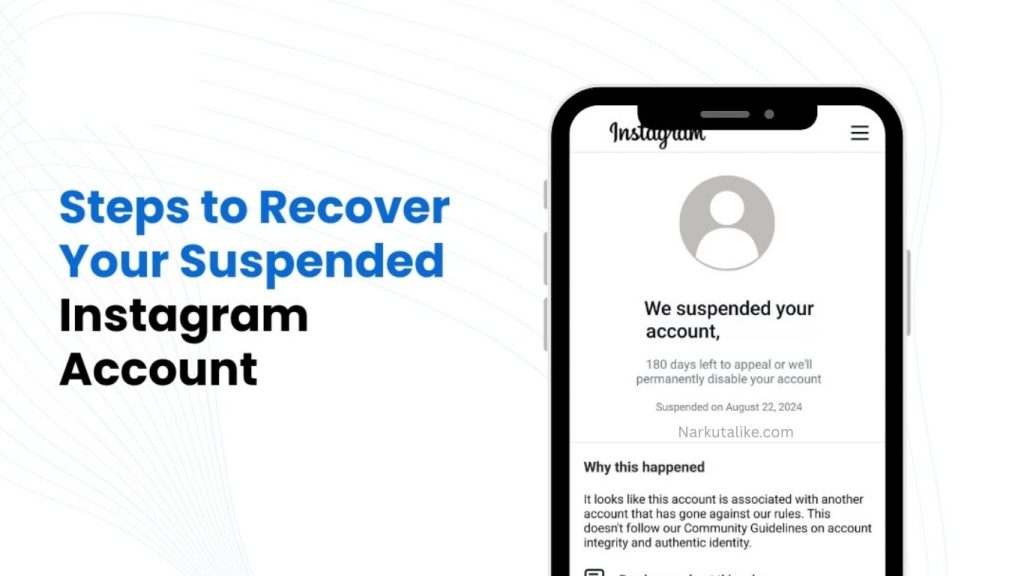
Losing access to an Instagram account can be frustrating, particularly when the profile contains important photos, messages, followers, business information, or years of personal content. Instagram accounts can become inaccessible for several reasons, including disabled profiles, forgotten passwords, suspicious activity, hacking attempts, security issues, or violations of Instagram’s rules. Fortunately, not every disabled or inaccessible account is permanently lost. Depending on the reason for the problem, users may be able to recover their profiles by following Instagram’s official recovery and appeal procedures. This Instagram Account Recovery Guide explains the most common reasons accounts become unavailable, how to recover disabled Instagram profiles, what to do if your account has been hacked, and how to protect your account after regaining access.
What Is a Disabled Instagram Account?
A disabled Instagram account is a profile that Instagram has restricted from normal use because its systems or review process detected activity that may violate its rules. When you attempt to log in, Instagram may display a message explaining that your account has been disabled, suspended, or restricted. This situation is different from forgetting your password because a password reset alone may not restore access. If Instagram has specifically disabled your profile, you may need to request a review and provide information confirming that you are the legitimate account owner. The recovery process depends on the reason for the disabling and the options Instagram provides on the login or recovery screen.
Why Does Instagram Disable Accounts?
Instagram may disable accounts for different reasons, with violations of its Community Guidelines or Terms of Use being among the most common. Accounts can face enforcement actions because of prohibited content, spam, harassment, impersonation, fraudulent behavior, misleading activity, or repeated violations. Suspicious activity can also trigger security systems, particularly when an account suddenly performs a large number of actions, uses unfamiliar login locations, or relies on unauthorized third-party applications. In some cases, users may believe their account was disabled incorrectly. When that happens, the best approach is to request an official review rather than attempting to bypass the restriction through unofficial methods.
How to Know If Your Instagram Account Is Disabled
The message displayed when you try to log in can help identify the problem. If Instagram explicitly says that your account has been disabled or suspended, the issue is likely related to an account restriction rather than a forgotten password. If your username and password are correct but you cannot access your profile, check whether the account can still be found from another Instagram profile. You should also check the email address connected to your Instagram account for security notifications or messages about recent changes. If someone changed your password, email address, or other information without your permission, your account may have been compromised rather than simply disabled.
How to Start Instagram Account Recovery
The first step in Instagram account recovery is to use the official Instagram app or website and attempt to log in normally. Carefully read the message displayed on the screen because Instagram may provide a specific option for requesting a review, appealing a decision, resetting your password, or confirming your identity. Follow the instructions shown for your particular account rather than relying on random recovery methods found online. If Instagram sends you a security code or recovery link, use it only through the official Instagram login or recovery process. Never provide verification codes or passwords to people who claim they can recover your account for you.
How to Appeal a Disabled Instagram Account
If you believe Instagram disabled your account by mistake, you can use the official appeal or review option provided during the recovery process. Enter accurate information and make sure that the details you submit correspond with the information associated with your account. A good appeal should be clear, honest, and focused on requesting a review of the account. Avoid submitting false information, making exaggerated claims, or repeatedly sending identical requests. Instagram may ask you to complete additional verification before making a decision. If this happens, carefully follow the instructions and provide only the information requested by the platform.
Instagram Identity Verification for Account Recovery
Instagram may require identity verification when it needs additional confirmation that the person attempting to recover an account is its legitimate owner. The verification process can vary depending on the account and the circumstances surrounding the recovery request. Instagram may ask for information associated with your account or require another security verification step. Always complete verification through official Instagram channels and avoid sending sensitive information to people who contact you through unofficial messages. Anyone claiming to have special access to Instagram’s internal recovery system should be treated with caution, particularly if they request payment or login credentials.
How to Recover a Hacked Instagram Account
A hacked Instagram account requires a different recovery approach from an account that was disabled because of a policy violation. If someone has accessed your account and changed your password, email address, phone number, or other security settings, start the official hacked-account recovery process as soon as possible. Check your email for legitimate Instagram security notifications because messages about recent changes may provide useful recovery instructions. After you regain access, immediately create a strong and unique password, review your login activity, remove unfamiliar sessions, and verify that your email address and phone number are correct. You should also enable two-factor authentication to provide additional protection against future unauthorized access.
How to Recover Instagram Password
If your Instagram account has not been disabled and you simply forgot your password, the recovery process is generally straightforward. From the Instagram login screen, use the password recovery option and enter your username, email address, or phone number. Instagram may send a login link or verification code through an available recovery method. After accessing the account, create a new and secure password that is not used on other websites. If you no longer have access to the email address or phone number associated with your profile, use the additional help or account recovery option provided by Instagram and follow the instructions displayed.
Can a Disabled Instagram Account Be Recovered?
A disabled Instagram account may be recoverable, but there is no guarantee that every profile will be restored. If Instagram determines that an account was disabled incorrectly or that the issue can be resolved after reviewing an appeal, access may be returned. However, accounts involved in serious or repeated violations may remain disabled. The result depends on the circumstances of the account and Instagram’s review process. Users should therefore avoid websites or individuals claiming they can guarantee account restoration because no outside person can guarantee a decision made by Instagram.
Why Instagram Account Appeals Can Fail
An Instagram recovery appeal may fail if the platform determines that the account violated its policies or if the submitted information does not sufficiently confirm account ownership. Repeated policy violations can also make restoration more difficult. In some situations, users may accidentally submit incomplete or inaccurate information, which can delay the process or result in an unsuccessful review. If Instagram provides another official review opportunity, follow the instructions carefully and make sure the information you submit is accurate. Avoid attempting to manipulate the review system or providing fake information because this can create additional complications.
How Long Does Instagram Account Recovery Take?
The amount of time required to recover an Instagram account can vary significantly. Simple password resets may be completed quickly, while disabled-account appeals and identity verification can take longer. Instagram does not provide one universal recovery timeframe for every account because each situation can involve different security checks and review requirements. During the process, monitor the email address associated with your account and look for additional instructions from Instagram. Sending repeated appeals or constantly attempting different recovery methods is unlikely to guarantee a faster response.
How to Avoid Instagram Recovery Scams
People who lose access to their Instagram accounts can become easy targets for scammers. Fraudsters may claim to be Instagram employees, security specialists, hackers, or professional account-recovery agents and promise to restore your profile for a fee. You should never give your Instagram password, two-factor authentication codes, backup codes, or other private security information to such individuals. Be especially suspicious of anyone who promises guaranteed recovery or claims to have direct access to Instagram’s internal systems. The safest approach is to use Instagram’s official recovery and support options rather than relying on unofficial services.
How to Secure Your Instagram Account After Recovery
After recovering your Instagram account, improving its security should be a priority. Create a strong, unique password that is not shared with other websites or applications. Enable two-factor authentication so that an additional verification step is required when someone attempts to access your account from an unfamiliar device. Review your recent login activity and remove devices or sessions that you do not recognize. Check the email address and phone number connected to your account and make sure they are still under your control. You should also review connected applications and remove access from services that you no longer use or do not recognize.
Instagram Account Recovery for Business and Creator Accounts
Recovering a business or creator Instagram account can be particularly important because the profile may be connected to customers, advertising campaigns, brand communication, and other business resources. Business owners and creators should keep their account recovery information updated and use strong security settings. If the Instagram account is connected with other Meta services, review those connections after recovering the profile. Maintaining accurate contact and ownership information can make it easier to address future security problems and reduce the risk of losing access to important business content.
What You Should Avoid During Instagram Recovery
During the recovery process, avoid actions that could make the situation more complicated. Do not repeatedly enter incorrect passwords, provide false information, submit fake identification, or attempt to bypass an account restriction through suspicious applications. Avoid creating numerous replacement accounts simply to circumvent a disabled profile. Most importantly, never share your password or verification codes with another person. If someone contacts you privately claiming that they can restore your account in exchange for money or sensitive information, treat the offer as suspicious and continue using official Instagram recovery channels.
Frequently Asked Questions
Can I Recover a Disabled Instagram Account?
Yes, some disabled Instagram accounts can be recovered if Instagram determines that the account can be restored or that the disabling occurred incorrectly. Users should follow the official appeal or review process and provide accurate information when requested.
How Can I Recover Instagram Without My Password?
If you still have access to the email address or phone number connected to your Instagram account, you can normally use Instagram’s password recovery option to receive a login link or verification code. If you no longer have access to those recovery methods, follow the additional account-help options provided by Instagram.
Can a Hacked Instagram Account Be Recovered?
A hacked Instagram account may be recoverable through Instagram’s official account-security and recovery process. After recovering the profile, change the password, verify your account information, review login activity, and enable two-factor authentication.
Should I Pay Someone to Recover My Instagram Account?
You should be extremely cautious about paying third parties for Instagram account recovery. No outside individual can guarantee that Instagram will restore a disabled profile. Never provide your password, authentication codes, or backup codes to someone claiming to offer guaranteed recovery.
What If My Instagram Appeal Is Rejected?
If your appeal is rejected, check whether Instagram provides another official review or recovery option. Follow any additional instructions carefully and avoid using unofficial services or methods that claim to bypass Instagram’s decision.
Conclusion
Recovering a disabled Instagram account can take patience, but using the correct process gives you the safest path toward regaining access. First determine whether the problem is a disabled account, forgotten password, hacked profile, or security restriction. If your account has been disabled incorrectly, use the official appeal process and provide truthful information. If the account has been hacked, prioritize recovering ownership and securing your login credentials. Once access is restored, use a strong unique password, enable two-factor authentication, review active login sessions, and remove suspicious third-party connections. Most importantly, avoid account-recovery scams and never share private security information with strangers. By following these steps, users can improve their chances of recovering their Instagram profile while also protecting it against future access and security problems.