
Instagram Reels have become one of the most effective ways to reach a larger audience, build a personal brand, and increase engagement on social media. Whether you are a content creator, influencer, business owner, or digital marketer, creating high-quality Reels is essential for standing out in a competitive platform. While creativity plays a significant role in making successful videos, many creators overlook one technical factor that can directly affect their performance: using the correct Reel size.Uploading a Reel with the wrong dimensions can cause your video to appear blurry, cropped, or poorly formatted. This negatively impacts the viewing experience and may reduce audience retention. On the other hand, using Instagram’s recommended Reel size ensures your videos appear sharp, professional, and optimized for both viewers and the platform’s algorithm. In this guide, you will learn everything about the best Reel size, recommended dimensions, resolution, aspect ratio, export settings, and practical tips for creating visually appealing Reels that perform better in 2026.
Why Choosing the Right Reel Size Is Important
Many creators spend hours filming and editing their videos but fail to optimize the final export settings. Instagram automatically compresses uploaded videos, and if your Reel does not match the platform’s recommended specifications, the quality can decrease significantly. Videos may become pixelated, lose important details, or display unwanted black borders around the edges.
Using the correct Reel size ensures your content fills the entire smartphone screen, providing viewers with an immersive experience. Full-screen vertical videos naturally capture more attention because they match how people hold their mobile devices. Professional-looking videos also encourage users to watch longer, increasing watch time, engagement, and the likelihood of being recommended on the Explore page or in users’ Reels feeds.
What Is the Best Reel Size?
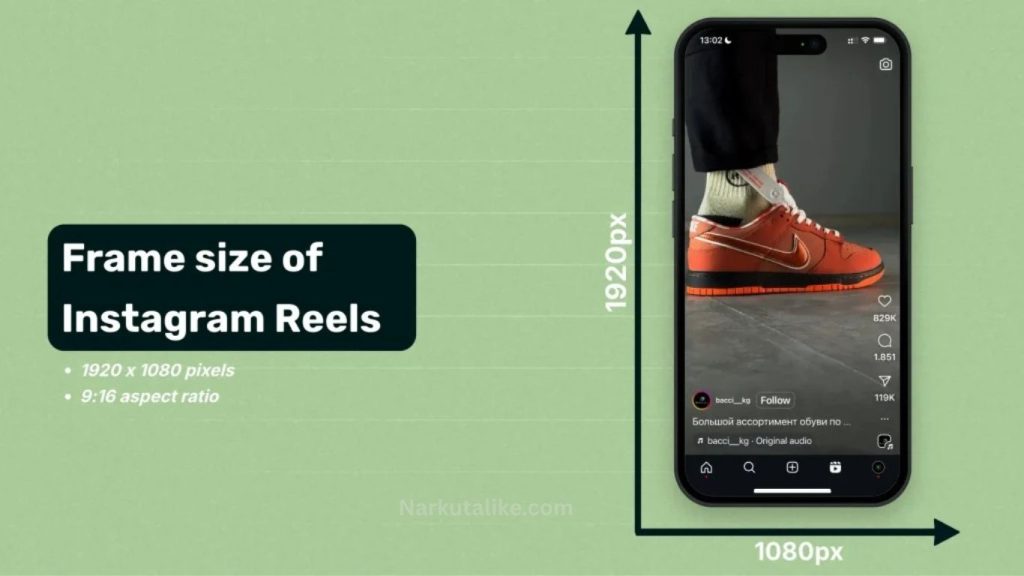
The ideal Instagram Reel size is 1080 × 1920 pixels, which uses a 9:16 aspect ratio. This vertical format has become the standard for mobile-first content because it fills the entire display without leaving empty spaces or requiring unnecessary cropping. Recording and exporting your videos in these dimensions helps preserve image quality while ensuring Instagram displays your content correctly across different devices.
Although Instagram can accept videos with lower resolutions, uploading videos at Full HD quality provides a much sharper viewing experience. Higher-quality videos also handle Instagram’s compression better, resulting in clearer visuals after publishing. For creators aiming to produce professional content, 1080 × 1920 pixels should always be the preferred choice.
Understanding the 9:16 Aspect Ratio
The aspect ratio refers to the relationship between a video’s width and height. Instagram Reels are specifically designed for a 9:16 vertical layout, making them ideal for smartphone viewing. Since most users browse Instagram on their phones, vertical videos feel more natural and engaging than horizontal ones.
If you upload a landscape video with a 16:9 aspect ratio, Instagram will either crop parts of the frame or display black borders, reducing its visual appeal. Similarly, square videos may not utilize the available screen space effectively. Recording vertically from the beginning eliminates these problems and allows your audience to enjoy your content without distractions.
Best Resolution for Instagram Reels
Video resolution determines how clear and detailed your Reel appears. Instagram recommends uploading videos in 1080p resolution, which measures 1080 pixels wide by 1920 pixels tall. This resolution strikes the perfect balance between image quality and file size, making it suitable for fast uploads while maintaining excellent visual clarity.
If your smartphone supports 4K recording, you can capture your footage in 4K and later export it in 1080p. Starting with higher-resolution footage often produces sharper final results because more detail is preserved during editing. However, regardless of your recording resolution, your exported Reel should ideally match Instagram’s recommended dimensions for the best viewing experience.
Choosing the Right File Format
Another important factor influencing Reel quality is the video format you upload. Instagram works best with MP4 files encoded using the H.264 video codec and AAC audio codec. These settings ensure smooth playback while minimizing compression artifacts.
Using unsupported or outdated file formats may lead to processing issues or lower video quality after uploading. Exporting your Reels as MP4 files with high-quality settings helps maintain sharp visuals, clear audio, and faster upload times. Most modern video editing software automatically includes these options, making them easy to select before exporting your project.
How Reel Size Affects Video Quality
Many users assume that expensive cameras alone guarantee professional-looking content. While camera quality certainly helps, proper video sizing plays an equally important role. Even footage captured with a high-end camera can appear blurry if exported using incorrect dimensions or low-quality settings.
Instagram compresses every uploaded video to improve loading speed across its platform. Videos that already match Instagram’s preferred specifications usually experience less noticeable quality loss than incorrectly sized videos. This means your audience sees clearer visuals, smoother motion, and more vibrant colors, improving the overall viewing experience and increasing the likelihood that viewers will watch until the end.
Safe Zones: Keep Important Content Visible
Although Instagram Reels use the full screen, not every part of the display is available for your content. Various interface elements, such as the profile picture, username, captions, music information, and engagement buttons, appear on top of your video. If important text or graphics are placed too close to the edges, they may be hidden behind these overlays, making your message difficult to read.
To avoid this problem, keep titles, subtitles, logos, and call-to-action text closer to the center of the frame. Leaving enough space around the edges ensures that your audience can clearly see every important detail regardless of where the Reel is viewed. This simple adjustment makes your content look cleaner and more professional while improving the overall viewing experience.
The Best Cover Size for Instagram Reels
Your Reel cover is often the first thing people notice before deciding whether to watch your video. An attractive cover image increases curiosity and encourages more users to click on your content. Instagram recommends creating Reel covers with the same dimensions as the video itself, which is 1080 × 1920 pixels.
However, it is also important to remember that your Instagram profile displays Reels in a cropped grid. If your title or graphics are placed too close to the top or bottom, they may be cut off in your profile view. Designing your cover with the main text centered ensures that it remains visible in both the Reel feed and your profile gallery, helping maintain a consistent and professional appearance.
Best Export Settings for High-Quality Reels
After editing your video, exporting it with the correct settings is just as important as recording it properly. Even an excellent video can lose quality if it is exported using low-resolution or highly compressed settings. The ideal export should maintain the original sharpness while remaining compatible with Instagram’s upload requirements.
Export your Reel in 1080 × 1920 pixels using the MP4 format with the H.264 codec and AAC audio. A frame rate of either 30 or 60 frames per second works well depending on your content, while a high bitrate helps preserve image clarity. These settings produce a smooth, high-quality video that remains visually appealing even after Instagram applies its own compression.
Tips for Recording Better Instagram Reels
Creating professional-looking Reels starts before the editing process. Good lighting is one of the biggest factors affecting video quality. Natural daylight often produces the most flattering results, while soft artificial lighting can also create a clean and balanced image. Dark environments introduce digital noise, making videos appear grainy after upload.
Holding your phone steady is equally important. Shaky footage distracts viewers and reduces the overall production quality. Using a tripod, gimbal, or stable surface allows you to record smoother videos that look more polished. Recording vertically from the beginning also prevents cropping issues during editing and ensures your footage perfectly matches Instagram’s recommended aspect ratio.
If your smartphone supports higher resolutions, recording in 4K provides additional flexibility during editing. Although you may export the final Reel in Full HD, starting with higher-quality footage often results in sharper and more detailed videos after compression.
Common Mistakes That Reduce Reel Quality
Many creators unknowingly lower their Reel quality by making a few avoidable mistakes. One of the most common errors is uploading videos that were originally designed for other platforms, such as YouTube. Horizontal or square videos rarely perform as well because Instagram prioritizes vertical content that fills the entire screen.
Another frequent mistake is repeatedly downloading and re-uploading edited videos. Every time a video is compressed and saved again, it loses a small amount of quality. After several edits, the final upload may appear noticeably blurry. Editing directly from the original source files helps preserve maximum image quality.
Using screenshots, low-resolution clips, or heavily zoomed footage can also reduce sharpness. Instead, always work with the highest-quality original files available. Clean visuals create a better viewing experience and increase the chances of viewers staying engaged throughout the entire Reel.
How the Right Reel Size Improves Engagement
Although Instagram’s algorithm considers many factors when ranking content, video quality has a direct impact on viewer behavior. A clear, full-screen Reel naturally attracts more attention than a blurry or poorly cropped video. When viewers enjoy watching your content, they are more likely to watch until the end, replay the video, or interact by liking, commenting, and sharing it.
Higher engagement sends positive signals to Instagram’s algorithm, increasing the likelihood that your Reel will be recommended to a broader audience. While great storytelling and creativity remain essential, using the correct Reel size supports your content by presenting it in the best possible way.
Editing Software for Perfect Reel Dimensions
Modern video editing applications make it easy to create Instagram-ready Reels without worrying about incorrect dimensions. Many editors include built-in templates specifically designed for Instagram’s vertical format, allowing creators to edit with confidence.
Professional editors often choose Adobe Premiere Pro, Final Cut Pro, or DaVinci Resolve because these programs provide precise control over resolution, frame rates, color correction, and export quality. Beginners frequently prefer user-friendly applications like CapCut, VN Video Editor, or Canva, which offer simple drag-and-drop tools while automatically maintaining Instagram’s recommended dimensions.Regardless of which software you use, always verify the export settings before uploading to ensure your Reel maintains the highest possible quality.
Future Trends in Instagram Reel Sizes
As smartphone technology continues to improve, social media platforms are increasingly supporting higher-quality video formats. Although Instagram currently recommends Full HD resolution for Reels, future updates may introduce better support for HDR content, higher frame rates, and enhanced video compression technologies.
Despite these advancements, the vertical 9:16 aspect ratio is expected to remain the standard for mobile content. Since most users continue to consume social media through smartphones, creators who consistently produce high-quality vertical videos will remain well-positioned for future platform updates and algorithm changes.
Frequently Asked Questions
What is the best Reel size for Instagram?
The best Instagram Reel size is 1080 × 1920 pixels with a 9:16 aspect ratio. This vertical format fills the entire mobile screen and delivers the highest visual quality.
What is the ideal aspect ratio for Instagram Reels?
The recommended aspect ratio for Instagram Reels is 9:16. It is designed for vertical viewing and provides the best user experience on smartphones.
Can I upload a 4K video as an Instagram Reel?
Yes, you can upload a 4K video, but Instagram will compress it during processing. Recording in 4K and exporting in 1080 × 1920 pixels often produces excellent results.
Which file format is best for Instagram Reels?
The best file format is MP4 using the H.264 video codec and AAC audio codec. This format offers the best balance of quality and compatibility.
Why do my Instagram Reels look blurry?
Reels may appear blurry due to low-resolution videos, incorrect export settings, excessive compression, poor internet connection during upload, or uploading videos with the wrong dimensions.
Conclusion
Choosing the best Reel size is one of the easiest ways to improve the quality and performance of your Instagram content. By recording and exporting videos in 1080 × 1920 pixels with a 9:16 aspect ratio, you ensure that every Reel fills the screen perfectly while maintaining sharp visuals and professional presentation.Technical optimization alone will not guarantee viral success, but it creates a strong foundation that allows your creativity to shine. When high-quality visuals are combined with engaging storytelling, compelling hooks, trending audio, and consistent posting, your Reels have a much better chance of reaching larger audiences and generating meaningful engagement. Whether you are building a personal brand, growing a business, or becoming a full-time content creator, mastering the correct Reel size is an important step toward long-term success on Instagram in 2026.